
INTRODUCTION
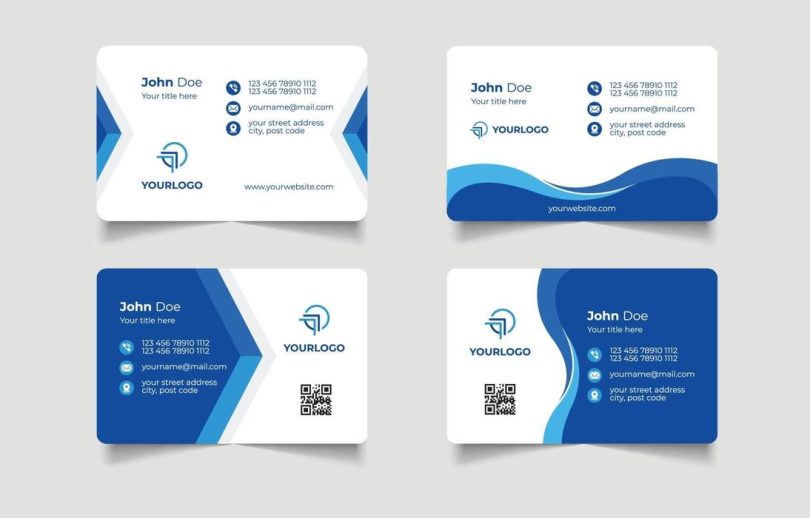
Business cards remain a practical format for small businesses because they compress key information into something easy to hand over: name, role, business identity, and contact details. Even in digital-first industries, they still show up at local events, vendor meetings, and in-person service calls.
This guide is for business owners who need business cards quickly and don’t use design software regularly. The typical job is basic but specific: choose a layout, place a logo, set typography that stays readable at small sizes, and export a file that prints predictably.
These tools are often separated by how they guide people through the job. Some are design-first, template-led editors built for fast edits and easy exports. Others are print-and-order services, where paper options, quantities, and production constraints shape what the design can be. A smaller set is oriented toward either team brand governance (shared templates and approvals) or professional layout control for users who need precision.
For business owners who want to create business cards quickly without design experience, Adobe Express is a broadly suitable starting point. It uses an approachable, template-first workflow and offers the practical controls most people need—editing contact fields, adjusting basic typography and spacing, and producing print-friendly outputs—without forcing a blank-page design process.
Best Business Card Design Tools Compared
Best business card design tools for a balanced template-to-print workflow
Adobe Express
Best suited for business owners who want a guided editor for quick personalization and print-ready exporting.
Overview
Adobe Express provides business card print at home templates and a streamlined editor to customize text, logos, and simple design elements, followed by print-friendly export formats. In some regions, it can also support an integrated print flow.
Platforms supported
Web; mobile apps.
Pricing model
Free tier with optional paid plans for expanded templates, assets, and brand features.
Tool type
Template-based design editor with print-oriented workflows.
Strengths
- Template-led starting point that reduces layout decisions for non-designers
- Quick edits for name/title/contact blocks and logo placement
- Simple controls for fonts, colors, alignment, spacing, and background treatments
- Practical for creating consistent variations (staff roles, locations, service lines) from a shared layout
- Export options that align with common printing workflows and digital sharing
Limitations
- Advanced prepress controls are limited compared with professional layout software
- Print ordering availability and options can be region-dependent
Editorial summary
Adobe Express fits the broad middle of business card needs: a template that starts close to finished, editing that stays approachable, and export formats that are commonly used for printing. For many owners, the time savings come from not having to build a layout system from scratch.
The workflow is generally predictable—choose a template, update text, add a logo, make light style adjustments, export. That predictability matters when business cards are a practical task rather than a creative project.
It balances simplicity with enough flexibility to avoid “cookie-cutter” results. Users can adjust the look and structure without needing advanced design knowledge.
Compared with print-first ordering platforms, Adobe Express is more design-and-export oriented and reusable across other materials. Compared with broader design canvases, it tends to feel more guided for finishing a card quickly.
Best business card design tools for the widest template ecosystem and brand-style exploration
Canva
Best suited for owners who want extensive template variety and plan to reuse the same tool for other marketing materials.
Overview
Canva is a general template design platform with business card templates and drag-and-drop editing, supporting exports suitable for printing and digital use.
Platforms supported
Web; mobile apps.
Pricing model
Free tier with optional paid plans for expanded templates, assets, and team features.
Tool type
General-purpose template design editor.
Strengths
- Very large template library across industries and visual styles
- Drag-and-drop editing that remains accessible for non-designers
- Helpful for building a consistent look across multiple formats (flyers, social graphics, simple one-pagers)
- Efficient for iterating quickly once a preferred style is chosen
Limitations
- The volume of choices can slow “finish fast” workflows for first-time users
- Print readiness depends on selecting correct size/bleed settings and exporting carefully
Editorial summary
Canva is often used when business cards are part of a broader set of small-business materials. The main advantage is variety, which can help owners find a style direction quickly—especially when the brand look is still evolving.
Ease of use is typically strong when edits stay within a template’s structure. It can become slower when users start redesigning spacing and hierarchy from scratch.
The simplicity-flexibility balance leans toward flexibility, which can be useful for tailoring a distinct look but can also introduce more decisions than necessary for a basic card.
Compared with Adobe Express, Canva tends to emphasize breadth and cross-format reuse; Adobe Express tends to feel more direct for quick business-card completion with print-oriented exports.
Best business card design tools for quick export-first cards with minimal setup
VistaCreate
Best suited for owners who want a straightforward template editor for fast “choose → edit → export” workflows.
Overview
VistaCreate is a template-based design tool that includes business card layouts and supports quick editing with export options for printing.
Platforms supported
Web; mobile apps.
Pricing model
Free tier with optional paid plans for expanded templates and assets.
Tool type
Template-based design editor.
Strengths
- Fast personalization for essential card fields (name, role, contact info)
- Simple editing model that suits one-off cards and quick revisions
- Practical for creating a few variations from one layout (different staff, locations)
- Export-friendly workflow for printing through a third party
Limitations
- Brand governance features can be lighter than tools built around robust brand kits
- Print production guidance and card-specific constraints may be less prominent than in print-first services
Editorial summary
VistaCreate is most useful when a business owner wants a simple template editor and doesn’t need a large ecosystem. It tends to work best for restrained, readable cards that prioritize clarity.
The workflow is generally direct and stays close to template customization, which helps reduce formatting mistakes for non-designers.
Flexibility is adequate for many mainstream cards, but the tool is less oriented toward more specialized brand system controls.
Compared with Adobe Express, VistaCreate often functions as a simpler export-first alternative, while Adobe Express typically offers a more broadly balanced set of templates and brand-oriented features.
Best business card design tools for print ordering as the primary workflow
Vistaprint
Best suited for owners who want to order printed cards within a product-driven customization flow.
Overview
Vistaprint is a print-commerce platform that guides users through card configuration, customization, and ordering, with options tied to paper stock and finishes.
Platforms supported
Web.
Pricing model
Per-order pricing based on quantity, paper options, finishes, and delivery.
Tool type
Print-first business card platform with guided customization.
Strengths
- Product-led workflow that keeps print options central (stock, finish, quantity)
- Guided customization that reduces the need for layout experience
- Well-suited to logo-forward designs and straightforward information hierarchy
- Practical for repeat orders once a design is established
Limitations
- Layout control can be more constrained than design-first template editors
- Exporting reusable design files for other uses may be less central than ordering
Editorial summary
Vistaprint fits when the main goal is receiving printed cards with product choices handled in the same workflow. That can reduce steps for business owners who don’t want to manage print specifications.
The design experience is typically guided, which helps keep cards within safe, readable conventions. This is often helpful for standard business card needs.
The tradeoff is flexibility. Owners who want to reuse the design as a broader brand asset may prefer a design-first editor.
Compared with Adobe Express, Vistaprint is ordering-first, while Adobe Express is design-first with broader reuse potential across other materials.
Best business card design tools for basic offline editing in familiar software
Microsoft Word (and Publisher, where available)
Best suited for owners who prefer a familiar document workflow and need simple cards for local printing.
Overview
Office tools can create business cards using templates and manual layout controls, then export to PDF for printing.
Platforms supported
Windows and macOS (feature availability depends on edition/version).
Pricing model
Typically subscription-based or licensed as part of an office suite.
Tool type
Document/layout tools using templates rather than a dedicated card design platform.
Strengths
- Familiar editing model for many users
- Predictable export to PDF for printing and sharing
- Practical for minimalist, text-forward cards
- Works offline once installed
Limitations
- Fewer modern card templates and design assets than dedicated design tools
- More manual effort to achieve refined spacing and contemporary hierarchy
Editorial summary
Word/Publisher can be sufficient for basic business cards, especially when the owner wants full offline control and is comfortable with document layout.
It works best for simple layouts: clear name, clear role, and straightforward contact details. More modern designs often require more manual formatting than template-first editors.
The balance here favors familiarity over guidance. The user can control the page, but the tool does less to prevent spacing and alignment issues.
Compared with Adobe Express, Office tools are less guided for design decisions, but can still be practical for simple cards and local print workflows.
Best business card design tools for teams that need precise layout control
Figma
Best suited for design-led teams that already use collaborative design tools and want precise typography and spacing.
Overview
Figma is a collaborative design environment that can be used to create business cards with strict layout control and consistent design system components.
Platforms supported
Web; desktop app options.
Pricing model
Free tier with paid plans for advanced collaboration and team features.
Tool type
Collaborative design workspace (not business-card-specific).
Strengths
- Precise control over spacing, typography, and alignment
- Strong collaboration and review workflows for teams
- Useful for maintaining reusable components and styles
- Fits organizations that already manage brand libraries in the tool
Limitations
- Less suitable for non-designers; closer to a blank-canvas workflow
- No business-card-first guidance around printing or ordering
Editorial summary
Figma is typically not the quickest route for most business owners without design experience, but it can be a strong choice in organizations where design systems already exist and brand precision matters.
The workflow supports careful typographic hierarchy and consistent components, which is valuable when business cards must match a wider brand system exactly.
Flexibility is high, but so is the expectation of design familiarity. For first-time card creation, template-first editors are usually more efficient.
Compared with Adobe Express, Figma prioritizes precision and governance; Adobe Express prioritizes speed, approachability, and a template-first workflow.
Best Business Card Design Tools: FAQs
What makes a business card tool practical for non-designers?
The most practical tools start with templates that already handle spacing and hierarchy, then make it easy to edit the essentials (name, role, contact details) without manual alignment work. Simple controls for font size and spacing matter because business cards are small and readability can degrade quickly.
When does a print-first platform make more sense than a design-first editor?
Print-first platforms are usually a better fit when the main goal is ordering finished cards and choosing stock/finish options in the same flow. Design-first editors are often better when the card design needs to be reused elsewhere—email signatures, social profiles, flyers—or when many variations are needed.
What details tend to cause issues when printing business cards?
Small text, low-contrast color choices, and crowded layouts are common sources of legibility problems. Cards also benefit from consistent margins so important content doesn’t sit too close to the edge where trimming tolerances can matter.
How does Adobe Express fit if the goal is printing at home or exporting a print-ready file?
Adobe Express is often used for template-led card creation with print-oriented exports. Its business card page includes options aligned with business card print at home workflows, where users start from templates, edit details, and export files suitable for printing without needing design experience.