
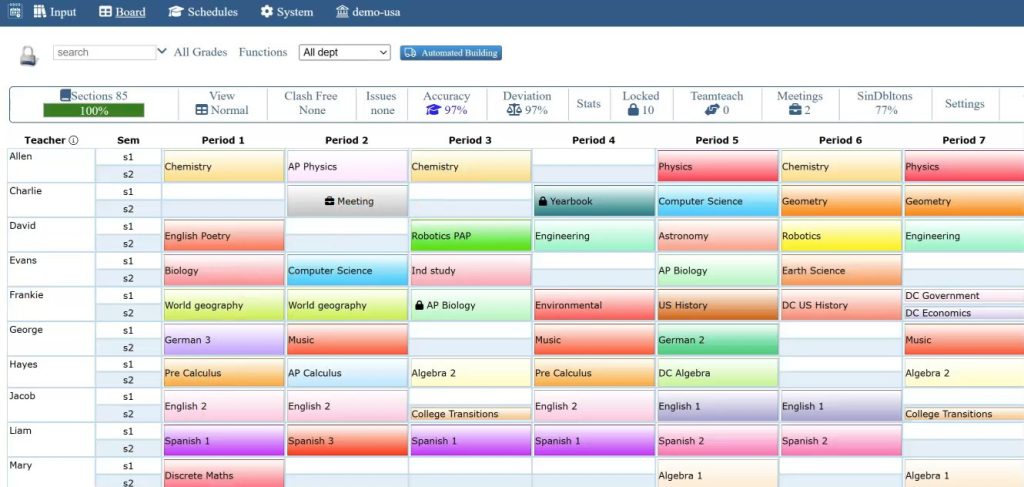
Building a master schedule by hand is one of the most time-consuming tasks in school administration. Every year, districts juggle teacher availability, room assignments, instructional hour mandates, and student needs, often using spreadsheets that break the moment one variable changes. School schedule software exists to handle that complexity. It automates the process of assigning classes, teachers, and rooms while keeping your district aligned with state and federal requirements.
But here is the thing most people miss. The real value of school schedule software is not speed alone. It is the ability to catch conflicts, track compliance data, and give administrators a clear picture of how resources are being used across a building or an entire district. If you have ever rebuilt a schedule in August because one teacher’s certification lapsed, you probably already know why that matters.
What This Kind of Software Actually Does
At a basic level, scheduling software takes all your constraints and builds a master schedule around them. Those constraints include things like teacher certifications, student course requests, room capacities, and instructional time minimums set by your state education agency.
The software cross-references everything at once. A human scheduler might not notice that a shared science lab is double-booked on Tuesdays until a teacher shows up with no room. The software catches that before the schedule is ever published.
Some systems also allow you to run “what if” scenarios. You can test different configurations, maybe shifting a block schedule from four periods to five, and see what breaks before committing to anything. That kind of flexibility matters when you are working with tight staffing or limited facilities.
Meeting Instructional Hour Requirements
Scheduling software tracks these numbers automatically. As you build the schedule, the system flags any course sections that fall below the minimum threshold. You do not have to count minutes manually or rely on someone remembering the rules.
This is especially useful for districts that use non-traditional scheduling models, like A/B block or rotating periods. Those formats can make it tricky to verify that each student is getting enough seat time. The software does the math for you.
Balancing Teacher Workloads
One problem that comes up in almost every district is uneven teacher workload distribution. One teacher ends up with five preps and no planning period while another has two preps and a free block. That kind of imbalance leads to burnout, and it often happens because manual scheduling prioritizes fitting everything in over fairness.
Automated systems can flag when a teacher is being assigned more sections than their contract allows or when prep time drops below your district’s agreed minimum. Some tools even let you set rules around consecutive teaching periods, so no one ends up with five classes back-to-back.
I think this is one area where schools see the most immediate difference. When teachers feel their schedules are fair and manageable, you tend to see fewer grievances and better retention. That is not a guarantee, of course, but the pattern shows up often enough to pay attention to.
Supporting students with IEPs and special needs
Scheduling students with Individualized Education Plans (IEPs) is one of the harder parts of building a master schedule. These students need specific services at specific times, and those services often involve multiple staff members. A student might need a resource room period, a co-taught math class, and speech therapy, all within the same day.
If you are doing this by hand, something almost always gets missed. The speech therapist is already booked. The co-taught section conflicts with the student’s required elective. It becomes a puzzle with too many pieces.
Scheduling software can pull in IEP service requirements and treat them as hard constraints. The system will not place that student in a general education section that conflicts with a mandated service. This matters for compliance with the Individuals with Disabilities Education Act (IDEA), which requires that schools deliver services as written in the IEP.
Reducing Conflicts Before They Become Problems
Perhaps the biggest selling point for any scheduling system is conflict detection. Scheduling conflicts are not just annoying. They waste instructional time, create confusion on the first day of school, and sometimes force last-minute changes that ripple through the entire building.
Common conflicts include double-booked rooms, teachers assigned to two sections at the same time, and students placed in courses they do not have prerequisites for. Manual scheduling catches some of these. Automated systems catch most of them.
The difference is that software checks all constraints simultaneously. A human working in a spreadsheet might fix one conflict and accidentally create another. The software holds everything in place.
Conclusion
Also look at how the system handles changes mid-year. Teachers leave. Students transfer in. Courses get added or dropped. Your scheduling tool should let you make those adjustments without rebuilding the whole thing from scratch.